

Billable Capacity
Administrative work may reduce the time available for legal work.
→
Law Firms
Your attorneys need time to focus on cases, advise clients, and apply their legal expertise. Instead of chasing documents, handling intake, answering the same questions, and dealing with IT issues that can eat into productivity.
Executive Priority
A law firm depends on attorneys and skilled staff using their time where professional judgment creates the most value. Intake, follow up, document requests, status questions, system problems, and administrative coordination may limit professional capacity.
Illustrative example of time allocation · Total: 100%
Administrative work may reduce the time available for legal work.

Slow intake and inconsistent communication may affect the client experience before or during a matter.

Confidential information, system reliability, and communication practices contribute to confidence in the firm.
Administrative work may reduce the time available for legal work.
Slow intake and inconsistent communication may affect the client experience before or during a matter.
Confidential information, system reliability, and communication practices contribute to confidence in the firm.
Recognizable Operating Problems

Prospective clients may be contacted, qualified, scheduled, and routed through repetitive employee effort.

Employees repeatedly answer routine questions about appointments, documents, matter status, and next steps.

Employees may manually track information or files and ask clients for missing items several times.
Information may move between email, forms, documents, case systems, spreadsheets, and individual employee knowledge.

Sensitive client information may be exposed through weak access practices, email risk, unmanaged sharing, or inappropriate AI use.

Attorneys may become involved in administrative coordination, technology problems, or routine communication that a better process could support.
Prospective clients may be contacted, qualified, scheduled, and routed through repetitive employee effort.
Employees repeatedly answer routine questions about appointments, documents, matter status, and next steps.
Employees may manually track information or files and ask clients for missing items several times.
Information may move between email, forms, documents, case systems, spreadsheets, and individual employee knowledge.
Sensitive client information may be exposed through weak access practices, email risk, unmanaged sharing, or inappropriate AI use.
Attorneys may become involved in administrative coordination, technology problems, or routine communication that a better process could support.
SHAREPOINT & CLIENT FILES
Your team needs quick access to its work. Your firm needs control over who can open, edit, and share sensitive documents. KeenPlex Technologies builds SharePoint file systems around your matters, teams, and responsibilities.

Give attorneys, paralegals, and support staff access based on their roles and assigned matters.

Control which documents clients and outside counsel can access, and review permissions as needs change.

Keep shared work in firm-managed libraries, with version history to recover earlier versions when needed.
Matters › Example matter / 014
Illustrative permissions. Access is configured for each firm.

For firms already using Microsoft 365, SharePoint brings files, Outlook, Office, Teams, and work accounts into one connected environment. That makes collaboration and employee access easier to manage together. Google Drive and Dropbox also offer business security controls; SharePoint’s advantage here is the Microsoft integration and the way KeenPlex configures it for your firm.


REMOTE EMPLOYEES & DEVICE CONTROL
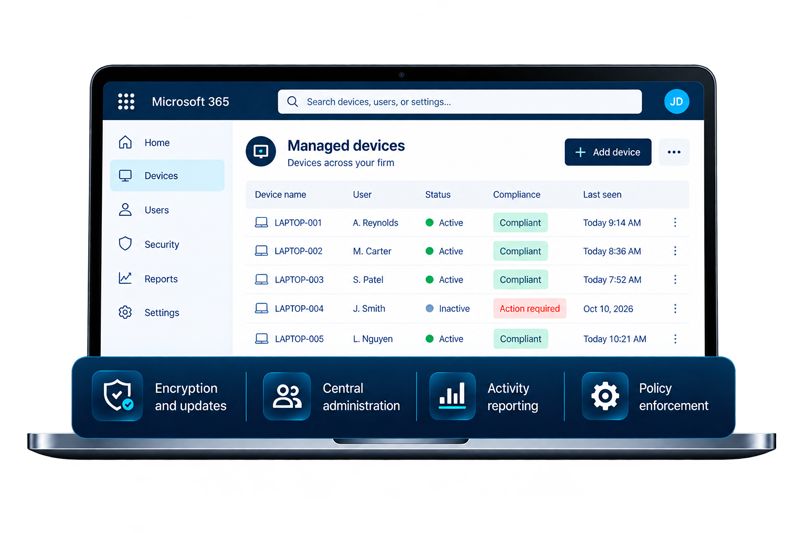
KeenPlex Technologies configures Microsoft 365 Business Premium and enrolled, firm-owned Windows Pro computers so security, employee access, and device administration can be managed centrally.

Apply encryption, updates, and access policies. Establish protected administrator access and recovery procedures so control does not depend on one employee’s password.

Add optional productivity monitoring for application use and activity trends, aligned with your firm’s disclosed employee policy.

Use available controls to restrict sensitive downloads, personal cloud uploads, copying, printing, and USB transfers on covered devices and applications.
A CLEARER EXIT PROCESS

Revoke supported sessions.

Retain email and firm records.

Reassign files and responsibilities.

Remove managed access and prepare reuse.
EMAIL, ENDPOINT & BROWSER SECURITY
A convincing email can put client files, passwords, and payment information at risk. KeenPlex Technologies uses complementary security layers to inspect messages, protect the click, monitor the computer, and secure sensitive information you send.
INCOMING EMAIL
Screen for phishing, impersonation, malicious links, and harmful attachments. Multiple checks help catch threats before they reach your team.
Sender checks · Link analysis · Attachment scanning
BROWSER SECURITY
KeenPlex Technologies browser security helps block phishing pages, risky downloads, and attempts to capture passwords. Policies can restrict selected uploads, downloads, copying, and printing.
Malicious-site protection · Credential protection · Data controls
ENDPOINT SECURITY
Monitor managed computers for suspicious activity and respond to detected threats, including isolating an affected device when supported and appropriate.
Device monitoring · Threat detection · Response
OUTGOING EMAIL
Use email encryption to help protect confidential messages and supported attachments. Apply recipient access and forwarding restrictions where available.
Encrypted delivery · Recipient access · Sharing rules
KEENPLEX AI SHIELD
A pasted client identifier or document can disclose information your firm never intended to share. KeenPlex Technologies adds controls that detect configured sensitive information and can block covered AI submissions before they are sent.

Check supported prompts for personally identifiable information (PII), such as Social Security numbers, account numbers, and other configured identifiers.

Set approved AI tools and permitted uses. Warn users or block detected policy violations in covered prompts and uploads.

Review available policy events and guide employees on what to remove before using an approved AI tool.
Protection is configured and tested for the browsers, applications, data patterns, and users included in your deployment.
A team member prepares a prompt
Summarize this client document.
Client identifier: [protected information]
Submission blocked by firm policy. Remove the protected details before continuing.
Review the prompt. Keep client details inside the firm.
Example of a configured policy response in a supported AI interaction.
AI EMPLOYEE & CLIENT INTAKE
When your team is with a client or the office is closed, a potential client can still take the next step. A KeenPlex Technologies AI Employee can answer calls, follow your approved screening questions, and text a link to an intake form connected to your compatible case management system.

Give callers a helpful first response and route inquiries using your firm’s instructions.

With the caller’s permission, send a link to your approved form so they can complete it on their own device.

Bring submitted details into the connected intake workflow and notify the right person, reducing repeated data entry and follow-up.
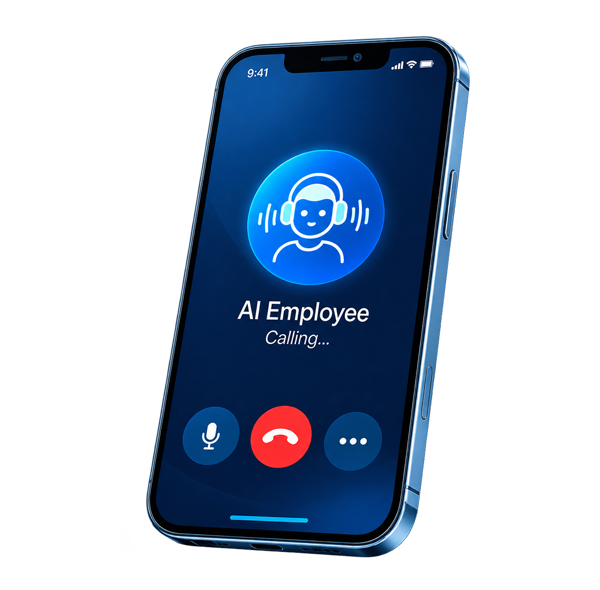
Connected intake workflow
 Call answered→
 Intake link sent→
 Form completed→
 Team reviews
Integration depends on your case management platform and intake setup. Your firm retains responsibility for conflict checks, legal advice, and accepting clients.
Document and Matter Workflow


Request the required documents from the client.

Client uploads or provides the requested documents.

Client receives confirmation of their submission.

Documents are reviewed for completeness and accuracy.

Reminders are sent for any missing items.

Files are organized and the matter is updated in the system.
Current Approach


KeenPlex Operating Model
Clarify whether leadership is protecting billable capacity, intake, responsiveness, resilience, or confidential information.
Examine the workflow, communication, system, or risk condition preventing the desired result.
Determine how the condition may affect attorney time, client experience, capacity, confidentiality, or resilience.
Connect appropriate communication, automation, managed technology, collaboration, and security capabilities.
Evaluate operating evidence and refine priorities.
Recommended Solutions
Support routine inquiries, information collection, qualification, scheduling, and appropriate employee escalation.
Improve requests, reminders, notifications, approvals, information movement, and routine client communication.
Improve reliability, employee support, device management, network operations, cloud systems, and executive visibility.
Support email, identity, Teams, SharePoint, document management, external sharing, and user administration.
Strengthen identity, endpoints, email, monitoring, employee practices, and response capability.
Improve visibility and governance around employee AI use involving sensitive information.
Provide evidence about whether an attacker can reach important systems and help prioritize remediation.
Expected Business Outcomes
A more consistent intake process can help protect employee and attorney capacity. Connected systems create the ability to improve information movement and visibility. Security improvements support client trust and operational resilience.
Secondary Assessment Paths
For repetitive communication, intake steps, document collection, approvals, and administrative handoffs.
For client information, identity, email, endpoint, Microsoft 365, and security visibility concerns.
For employee AI use, confidential information, governance, technical controls, and priority use cases.
Law Firm Resources
Frequently Asked Questions
Technology can make intake, communication, document movement, and support more consistent. That may reduce repetitive administrative effort and protect more attorney time for legal work.
Yes. Routine information collection, qualification, scheduling, and notifications can be supported while attorneys and skilled employees retain professional judgment and final review.
Workflow automation can support confirmations, reminders, status messages, and information requests while routing exceptions to the appropriate employee.
KeenPlex begins by reviewing the current workflow and systems. The recommended approach depends on available integrations, security requirements, and the operating outcome the firm is trying to improve.
Microsoft 365 can support identity, email, Teams, SharePoint, document management, external sharing, and user administration when configured around the firm’s requirements.
Leadership should understand the tools employees use, the information involved, approved use cases, responsibilities, governance expectations, and appropriate technical controls.
AI Shield can improve visibility into employee AI use, help identify where sensitive information may enter AI workflows, and support practical governance and control decisions.
Attack Path Assurance evaluates whether a meaningful attack path can reach important systems and provides evidence that can help leadership prioritize remediation.
The Law Firm Revenue Capture Assessment is the primary starting point when intake, responsiveness, or professional capacity may be limiting profitable case acquisition.
Yes. The review can consider shared workflows, collaboration, identity, network operations, user support, security, and visibility across locations.
Begin With the Operating Condition
KeenPlex Technologies can help identify where intake, communication, administrative work, technology, or risk may be limiting performance before recommending the appropriate solution.